
Zero-knowledge encryption means the company that stores your data never has the key to read it. Your files are encrypted on your device with a key made from something only you know, so the provider, its staff, a hacker who breaches it or anyone who sends it a court order only ever gets scrambled data. The price is simple: if you lose your password and recovery key, nobody can let you back in.
The one question: who can decrypt?
Almost every service today says "your data is encrypted". That sentence is nearly always true and nearly always beside the point. The question that matters is: who has the key?
- If the company holds the key, it can read your data whenever it wants or is made to, and so can anyone who gets into its systems.
- If only you hold the key, the company stores data it can't read.
"Zero-knowledge" is a marketing name for the second case. It isn't a formal standard, so the term alone proves nothing. What matters is whether the design really keeps the key away from the provider.
Zero-knowledge vs end-to-end vs encryption at rest
These three terms get mixed up constantly.
- Encryption at rest (and in transit). Data is encrypted on the company's disks and on the way there. Good against stolen hard drives and network snooping, but the company holds the keys. It's what most cloud services do by default.
- End-to-end encryption. Data is encrypted on your device and only decrypted on the devices of the intended recipients, which may be just your own devices. Servers in the middle carry ciphertext. Messaging apps and Apple's Advanced Data Protection use this term. More in end-to-end encryption explained.
- Zero-knowledge. Used mostly by storage and password-manager companies to say the same thing from the provider's side: we know nothing about your content because we never have your key.
In practice, "end-to-end encrypted storage" and "zero-knowledge storage" describe the same idea. Apple, for example, describes Advanced Data Protection as end-to-end encryption, and its iCloud data security overview lists which categories it covers. It doesn't use "zero-knowledge". With standard data protection, the default, Apple holds the keys for most iCloud data so it can help you recover it.
How a key can come from something only you know
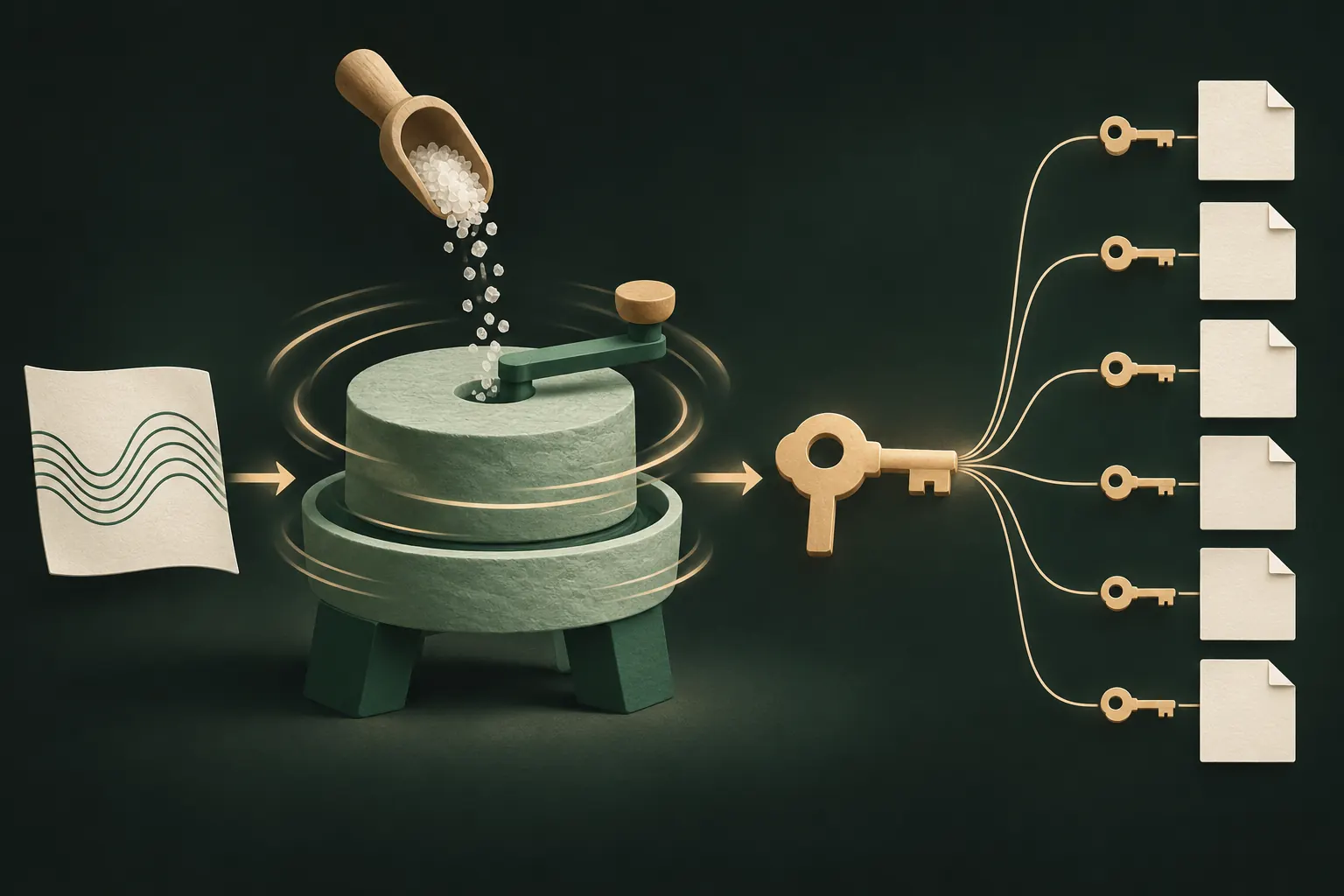
If the company never sees your key, where does it come from? Usually from your secret, through a process like this:
- You enter a password, passphrase or pattern on your device.
- A slow key derivation function (such as PBKDF2 or Argon2) stretches it into a long key. It runs many rounds on purpose, so each guess costs an attacker time.
- A random salt makes the result unique to you.
- That key unlocks a master key, which encrypts your files, often with a separate key per file. Encryption usually uses a cipher like AES-256.
- Nothing about the password is sent to the server that would let it rebuild the key. At most the server stores encrypted data.
Some services also give you a recovery key or phrase at setup. It's a second way to make the key, kept by you, not by them.
How to check a zero-knowledge claim
You can't audit the code yourself, but you can ask questions that expose a weak claim:
- "Can you reset my password?" If yes, with your files intact, they have a way to your key. That's not zero-knowledge.
- "Can I see my files on your website?" If the website decrypts them for you after a normal login, ask where that happens. Done right, it happens in your browser with your password; done wrong, on their server.
- "What happens if I forget my password and lose my recovery key?" The honest zero-knowledge answer is: your data is gone.
- Is there a published security document? Real designs are explained in detail: key derivation, ciphers, what the server stores.
- What metadata is still visible? Even with zero-knowledge content, a provider can often see file sizes, counts, timestamps, your account email and your IP address.
The price: nobody can reset it
Zero-knowledge flips the usual support model. With a normal service, forgetting your password is an inconvenience: you click a link in an email. With zero-knowledge, it can be permanent.
That's not a design flaw; it's the definition. Any reset path that doesn't need your secret is a path someone else could use: a support agent, an attacker who takes over your email, or an authority with a court order.
To live with it safely:
- Write down your recovery key or phrase and keep it away from the device, on paper or in a password manager you trust.
- Test it once while you still remember your password.
- Don't store it in the same place as the data it protects, like a screenshot in your photo library.
Our guide to recovery phrases covers this in more depth.
Where zero-knowledge doesn't help
It protects data on the provider's side. It doesn't protect:
- An unlocked device. On your phone, your data is decrypted for you, and so for anyone holding it.
- A weak password. If your secret is "123456", slow key derivation only delays the inevitable.
- Malware or a compromised app. Code running on your device sees what you see.
Legal requests and breaches
A zero-knowledge provider still has to answer legal requests. What it can hand over is what it has: encrypted files, plus whatever account data and logs it keeps. The content stays unreadable without your key.
The same goes for breaches. A stolen database of zero-knowledge vaults is a pile of ciphertext. The attacker's only hope is to guess weak passwords one by one, slowed by key derivation. That's why the strength of your secret still matters.

No account at all: the next step
Zero-knowledge removes the provider's access to your content. It doesn't remove the provider: there's still an account, an email, login records and a server that knows you exist.
The next step is not having that relationship at all. If an app keeps your data on your device, makes the keys from your secret, and backs up (if you choose) to storage you already own, there's no company account to breach, subpoena or reset.
The trade-off is the same as any zero-knowledge service, only stricter: lose both your pattern and your recovery phrase, and the files can't be opened by anyone.
The short version
- "Encrypted" isn't the question. "Who holds the key?" is.
- Zero-knowledge and end-to-end encrypted storage mean the provider never has your key.
- If a company can reset your password with your data intact, it isn't zero-knowledge.
- Keep your recovery key safe; nobody else can help.
- Fewer parties is better still: no account means nothing to breach in the first place.
Questions
Is iCloud zero-knowledge?
Not by default. With standard data protection Apple holds the keys for most data. With Advanced Data Protection on, most categories are end-to-end encrypted; Apple calls it that, not zero-knowledge.
Is zero-knowledge the same as end-to-end encryption?
They overlap. End-to-end is about data travelling between people or devices; zero-knowledge is about the provider never holding your key. Both mean the company can't read your data.
Can a zero-knowledge company be forced to hand over data?
It can be ordered to hand over what it has: encrypted data and metadata. Without your key, it can't decrypt it.
Why can't zero-knowledge apps reset my password?
Because your password is what makes the key. A company able to reset it would need a copy of the key, and then it wouldn't be zero-knowledge.
Keep it private on your iPhone
No account. No analytics. Encrypted on your iPhone.